Best Pc Stand With Wheels: Mobile, Adjustable Stands for Any Setup
The right PC stand with wheels can transform how you work, game, and study by freeing desk space, improving airflow, and simplifying relocation. This guide covers top rolling computer stands designed for ATX towers, printers, and peripherals. Each option integrates mobility, stability, and adjustable height to fit under desks or beside seating areas. Read on to compare features, materials, and usability across five popular models.
| Product | Brand | Key Feature |
|---|---|---|
| EUREKA ERGONOMIC PC Stand | EUREKA ERGONOMIC | 2-tier design with height adjustment and wheels |
| Hovadova Adjustable Mobile CPU Stand (Black) | Hovadova | 360° wheels with locking option |
| Liitrton Mobile CPU Stand | Liitrton | Adjustable width/length, sturdy steel build |
| Besiost Computer Tower Stand with Power Strips | Besiost | 4 levels, height adjustable, built-in power access |
| CSIHOP Height Adjustable Computer Tower Stand | CSIHOP | 2-tier setup with charging station and wheels |
EUREKA ERGONOMIC PC Stand: Flexible 2-Tier Tower Cart

The Eureka Ergonomic PC Stand is designed for versatility and mobility. It offers six gear height adjustments from about 23 1/4″ to 33 1/4″, enabling you to tailor spacing for effective heat dissipation. Its 2-tier construction provides a spacious bottom shelf for a PC tower and a top shelf for a printer, plants, or documents. A back Pegboard helps organize power strips and cables, while a mousepad is included for convenient mouse use. Four 360° wheels with brakes enable smooth movement and stable positioning on various floor surfaces.
This cart supports most full-size ATX cases and can act as a mobile workstation under a desk or beside a sofa. The design emphasizes stability with dual casters and locking brakes, ensuring the unit stays put when needed. The combination of mobility and extra storage makes it suitable for home offices, gaming rooms, or shared workspaces where space is at a premium.
Hovadova Adjustable Mobile CPU Stand (Black)

Hovadova’s CPU stand blends protection with easy movement. Protective side rails help prevent the PC from falling, while easy access to the back of the case simplifies cable management. Four 360° rotating wheels allow smooth repositioning, and two wheels can be locked to fix the stand in place. The sturdy metal frame and PS panel construction provide solid load-bearing capacity, supporting most PC towers safely and deterring accidental tip-overs. Quick assembly is possible without tools, streamlining setup in busy spaces.
The design accommodates under-desk placement and flexible workspace arrangements. This stand is suitable for gamers and students who need frequent reconfiguration or who want to elevate the tower away from dust and ground debris. The overall footprint supports efficient use of desk space while maintaining accessibility to ports and cables.
Hovadova Adjustable Mobile CPU Stand (Large)
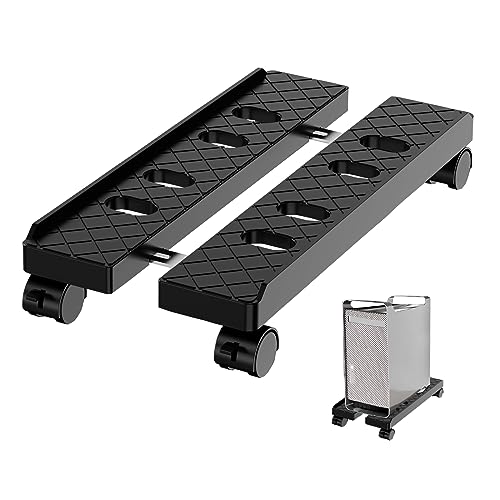
This larger variant from Hovadova mirrors the safety and mobility features of the standard model with emphasis on compatibility for larger PC towers. The protective rails, four 360° wheels, and locking capability deliver flexible placement options across rooms. The build prioritizes durability and stability to support extended daily use in student rooms, dorms, or shared spaces. Easy mobility helps with routine maintenance and cleaning underneath the stand.
The design integrates under-desk utility and a clean footprint for tighter layouts. Locking wheels ensure stability during gaming sessions or focused work, while the ventilated structure promotes airflow around the tower to help maintain cooler temperatures during long sessions.
Liitrton Mobile CPU Stand With 4 Casters
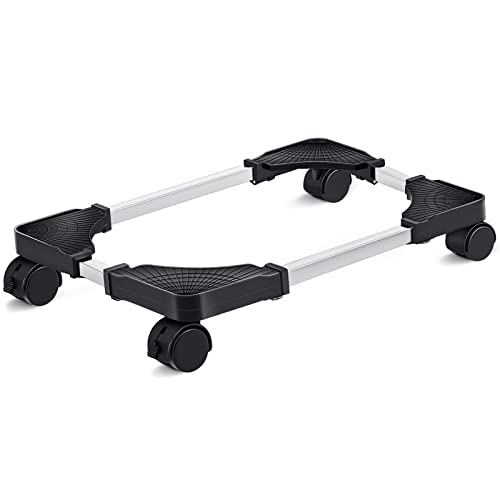
Liitrton’s stand emphasizes adaptability with adjustable width and length, designed to fit most computer towers. Four 360° rotating casters allow easy movement, and the steel frame is paired with ABS materials to provide sturdy support. The ability to lock wheels ensures the tower remains stationary during heavy gaming or processing tasks, while the overall construction focuses on reliability and ease of cleaning.
Practical for living rooms, bedrooms, or compact offices, this stand helps separate the tower from dust and floor contact. The adjustable dimensions help accommodate a wide range of cases, making it a flexible option for multi-device setups or shared desks.
Besiost Computer Tower Stand With Power Strips

Besiost’s stand features four levels of adjustable height, offering multiple configurations from 23″ to 33″ to fit desk heights and workload needs. Its built-in power strips and USB ports provide convenient charging and connectivity for devices, printers, and other peripherals. The rolling design helps you reposition the setup as needed and all wheels include locks to secure the cart when stationary.
The elevated design keeps airflow beneath the tower, supporting cooling and reducing dust collection. The carbon fiber-black aesthetic adds a modern touch to home or small-office environments. This model suits users who want turnkey power access along with mobility in a compact footprint.
CSIHOP Height Adjustable PC Stand With Wheels

CSIHOP combines a two-tier layout with an integrated charging station. The height is adjustable between 23″ and 34″ to fit under desks or align with work surfaces. Four 360° wheels enable smooth movement, and a hidden wheel design helps maintain a clean look when the unit is stationary. The inclusion of AC outlets and USB ports supports charging and device connectivity while keeping cables organized.
The design prioritizes ergonomic placement and space efficiency, making it suitable for gaming rooms, offices, or dorm setups where flexible positioning matters. The robust construction and versatile height options help users tailor the cart to their specific tower dimensions and workspace needs.
Bearfire Height Adjustable 2-Tier PC Stand with Wheels

The Bearfire stand offers a height range from 23″ to 33″, allowing most ATX towers to fit comfortably beneath desks or in open spaces. Its four 360° wheels provide easy maneuverability, with two locking casters to secure the unit during work or gaming. The top shelf supports a compact desk extension or other peripherals, while the bottom shelf houses a PC tower with stable framing.
Constructed with a thick steel frame and durable boards, it promises robust support for daily use. The design emphasizes practical mobility, making it appropriate for living rooms, bedrooms, or classrooms where portability and organization are key.
Buying Guide: Key Considerations When Choosing a PC Stand With Wheels
- Height range and adjustability: Ensure the stand can accommodate your desk height, chair level, and PC case dimensions to optimize airflow and reach.
- Mobility and stability: Look for 360° casters with at least two locking wheels to balance easy movement with secure placement on carpet or hard floors.
- Weight capacity: Verify the stand can support your PC tower’s weight plus any top-shelf items like printers or monitors.
- Ventilation and airflow: Open frames and ventilated panels help prevent overheating by improving airflow around the tower.
- Storage efficiency: Consider shelves, back panels, or integrated power strips that align with your workflow and cable management needs.
- Build quality and materials: Steel frames and durable surfaces improve longevity and ease of cleaning in busy spaces.
- Under-desk clearance: If you prefer a hidden setup, check the minimum height and overall footprint to fit beneath desks or shelves.
- Cable management: Back rails, grommets, or hooks help organize cords and reduce clutter for safer, tidier work areas.
- Ease of assembly: Tools-free or minimal-tool assembly reduces setup time, especially in shared or multipurpose rooms.