Best Computer Desk for Two Monitors: Space-Saving Home Office Solutions
For productive multitasking and comfortable ergonomics, a sturdy desk designed for two monitors is essential. This guide highlights five top picks that balance integrated charging, monitor support, and storage, making them ideal for home offices, gaming setups, or study spaces. Each option focuses on reliability, cable management, and easy adjustability to keep you comfortable during long sessions.
| Product | Key Feature | Why It Stands Out |
|---|---|---|
| Furologee 47″ Computer Desk | 2 monitor stands, built-in power outlets | Great charging access and focused monitor positioning |
| Rolanstar 39″ Desk | LED lighting, three drawers | Ambient setup with ample storage |
| ErGear 47.2″ Standing Desk | Electric sit-stand, memory presets | Ergonomic height flexibility for different tasks |
| Furologee 66″ L-Shaped Desk | Power outlets, two monitor stands | Corner footprint with wide workspace |
| HUANUO 48″ Standing Desk | 4 memory height settings | Reliable height options for varying workflows |
Note: The following sections present concise, objective details about each desk, focusing on how well they support dual monitors, charging needs, and storage. All product information is drawn from the listed features for clear comparison.
Furologee 47-Inch Desk With Monitor Stands

The Furologee 47″ desk integrates a charging station with three power outlets and two USB ports, supporting simultaneous charging for phones, tablets, and gaming gear. Two adjustable monitor stands (each about 18.9″ x 7.1″) hold dual displays at eye level, reducing neck strain by aligning screens with your line of sight. A fabric file cabinet and two-tier shelves provide organized storage for documents, printers, and office peripherals, keeping essential items within arm’s reach. The overall design balances a clean aesthetic with practical functionality, making it suitable for compact bedrooms or home offices where space efficiency matters.
In practice, this desk supports everyday computing and light gaming setups without clutter. The built-in outlets help minimize cable clutter, and the configurable monitor stands let you tailor screen placement. The fabric drawer and file cabinet are ideal for keeping mail, papers, or small devices out of sight. The assembly can be straightforward, though the integrated components may require careful alignment to ensure the drawers slide smoothly and the stands hold monitors securely.
Rolanstar Desk With Power Outlets And LED Light

The Rolanstar model blends a built-in power strip (two outlets, two USB ports, and one Type-C) with RGB LED lighting for an immersive gaming ambiance. A 39-inch footprint supports two monitors while maintaining a manageable desk area. The desk includes three fabric drawers and additional storage shelves, simplifying organization for papers, gaming gear, and school supplies. The monitor stand helps position screens ergonomically, reducing neck strain during long sessions. This option suits users who want a tech-forward desk with eye-catching lighting and practical storage.
Key considerations include the LED features, which can be synced with music or custom colors, and the trade-off of slightly smaller depth than larger L-shaped designs. For dual monitor setups, ensure your monitor sizes fit within the stand’s reach and that the power outlets meet your device charging needs. The fabric drawers offer lightweight storage but may not be as durable as hard-sided drawers over time.
ErGear Height Adjustable Electric Standing Desk

This electric standing desk offers a robust frame and a wide height range, from 28.35″ to 46.67″, enabling seamless sitting-to-standing transitions. Memory presets allow quick restoration of favorite heights, which is beneficial for alternating tasks such as drafting, coding, and drawing. The desk’s lifting mechanism has undergone extensive testing to ensure stability at various heights, and its solid construction is designed to support dual monitors and accessories without wobble. The Sit-Stand capability supports ergonomic health by enabling frequent posture changes throughout the workday.
Considerations include the electrical components’ long-term reliability and the desk’s footprint in your room. Weight limits and cable management features should be reviewed to ensure clean alignment of dual monitors and peripheral devices. If you frequently switch between tasks, the memory presets can save time and reduce disruption during workflow transitions.
Furologee 66-Inch L-Shaped Desk With Power Outlet
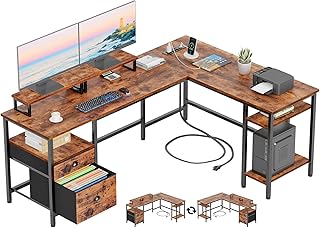
The L-shaped Furologee desk expands workspace with a reversible design, accommodating two monitor setups on the longer arm and a secondary surface for printers or accessories. A built-in charging station includes three outlets and two USB ports for convenient device charging. The two monitor stands can be positioned to align with your line of sight, reducing neck strain. A fabric drawer and two-tier storage shelves help organize documents and office supplies, while the spacious surface provides room for speakers, notebooks, and other essentials.
Optimization tips include placing the desk so the longer leg is adjacent to a wall outlet for easy power access and arranging cables along the desk’s edge to maintain a tidy work area. The fabric drawers are lightweight and easy to access but consider adding additional storage if you require more rigid filing options for frequent documents.
HUANUO Electric Standing Desk With Memory

The HUANUO desk emphasizes dependable construction, stable lifting, and durability through frequent lift testing. With a 48″ x 24″ desktop, it supports two monitors and other peripherals while providing a sleek, modern look. Four memory height settings simplify switching between seated and standing work modes, which can help reduce fatigue during long work sessions. The desk is designed to accommodate everyday computing tasks, heavy use, and multi-monitor workflows with dependable performance. The included cable manager and compact footprint enhance overall organization.
Important considerations include the noise level and speed of height adjustment, which can affect the user experience during frequent position changes. Ensure the desk can handle your specific monitor weight and size, and verify that the desk’s footprint fits your room layout without crowding the workspace.
Buying Guide: What To Look For In A Dual-Monitor Computer Desk
- Monitor compatibility: Measure your monitors and compare VESA patterns to ensure stands support your exact sizes. Check if stands are adjustable for height, tilt, and distance from the user.
- Power and charging: Look for built-in outlets and USB ports to reduce desk clutter. Verify the number and type of outlets to match your devices (USB-C, USB-A, QC fast charging).
- Desk configuration: Decide between straight desks, L-shaped desks, or curved corners based on room layout and standing/typing preferences. L-shaped options offer expansive work surfaces for multi-monitor setups.
- Ergonomics: Consider monitor height relative to eye level, chair height, and desk depth to ensure comfortable viewing angles and reduced neck strain. Standing desks add flexibility for posture changes.
- Storage and organization: Fabric drawers are light-weight but may wear over time. Look for metal drawers or additional shelves if you store heavier items or important documents.
- Durability and stability: A strong frame with reinforced joints prevents wobble when typing or using heavy peripherals. Check weight limits for both the desktop and the monitor stands.
- Cable management: Integrated channels, grommets, or clips minimize clutter and keep cables routed neatly behind or under the desk.
- Assembly and space: Consider the ease of assembly and the space the desk requires. Measure room dimensions to ensure a comfortable fit with chairs and doorways.
- Aesthetics and material: Choose finishes (white, rustic brown, black) that suit your decor, while considering wear resistance for high-traffic setups.
All five desks address dual-monitor needs, integrated charging or lighting options, and storage to support a productive home office or gaming space. When selecting, prioritize ergonomic compatibility, power availability, and the desk’s footprint to fit your room and workflow.