Best TV Wall Mount Unit for Modern Home Setups and Flexible Viewing
Choosing a reliable TV wall mount can dramatically improve living room aesthetics, reduce clutter, and make viewing more comfortable from any seat. The following selections focus on full-motion and corner designs that fit a wide range of screen sizes, VESA patterns, and stud spacings. Each option balances strength, tilt and swivel flexibility, and ease of installation. Below, find detailed sections for five top picks, along with a concise buying guide to help you compare features such as weight capacity, extension reach, and mounting compatibility.
Product Summary
| Product | Screen Range | Weight Capacity | Key Feature | VESA Max |
|---|---|---|---|---|
| Mounting Dream MD2380 | 32–65 inches | 99 lbs | Full motion with dual arms | 400×400 mm |
| USX MOUNT 42–86 in | 42–86 inches | 132 lbs | Dual articulating arms, wide swivel | 600×400 mm |
| Mounting Dream 37–75 in | 37–75 inches | 132 lbs | Low-profile, wide compatibility | 600×400 mm |
| Perlegear PGLF15 | 40–86 inches | 132 lbs | UL-listed, tool-free tilt | 600×400 mm |
| Perlegear Corner 32–75 in | 32–75 inches | 100 lbs | Extra long arm for corner mounting | 600×400 mm |
Mounting Dream MD2380 Full Motion TV Wall Mount

The MD2380 is designed for most 32–65 inch TVs with a maximum VESA of 400×400 mm and support up to 99 pounds. Its full-motion capability allows a tilt of up to 5 degrees downward and 15 degrees upward, along with left/right swiveling to adapt to seating positions. The mount extends up to 17.5 inches from the wall and retracts to 3.4 inches, adding versatility for rooms with multiple viewing angles. Installation is aided by a paper template, pre-labeled hardware, and a small storage solution for Allen keys. Post-install leveling adjustments of +/- 3 degrees help achieve precise alignment after setup.
USX MOUNT Full Motion TV Wall Mount (42–86″)

Designed for large screens, this USX MOUNT model accommodates 42–86 inch TVs with VESA configurations from 200×100 mm to 600×400 mm and supports up to 132 pounds. It features +5°/-15° tilt and +/-45° swivel, with a maximum swivel angle dependent on the TV model. The mount uses dual articulating arms for broad reach and flexibility. It requires 16 inches of wood stud spacing, and a post-install alignment adjustment helps achieve a perfectly level TV after mounting. The kit includes a detailed setup guide and pre-labeled hardware for straightforward assembly.
Mounting Dream 37–75 Inch Universal Tilt Mount
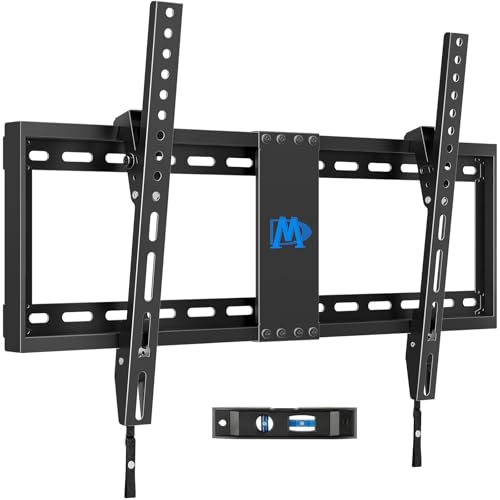
This low-profile Mounting Dream option tightens its profile by pulling the TV 1.5 inches closer to the wall, delivering a clean, space-saving appearance. It supports 37–75 inch TVs up to 132 pounds and up to 600×400 mm VESA patterns with 24-inch wood stud spacing. A tilt feature helps reduce glare and improve comfort during longer viewing sessions. The design emphasizes an attractive, unobtrusive wall presence while maintaining reliable tilt and load performance. Installation guidance emphasizes compatibility checks on stud spacing and TV weight before mounting.
Perlegear UL-Listed Full Motion TV Wall Mount (40–86″)

Perlegear’s PGLF15 is UL-listed and supports large TVs from 40 to 86 inches with VESA patterns from 200×100 mm to 600×400 mm. The design uses 12″ or 16″ wood studs and provides a tool-free tilt of +5°/-15° and a +/-45° swivel for flexible viewing. The mount is built on a reinforced plate and thicker articulating arms, aiming to deliver steadier movement for dynamic room layouts. If studs exceed 16 inches, upgrading to a compatible extension bracket is advised to preserve stability. Security features, including anti-drop elements, enhance reliability over time.
Perlegear Corner TV Wall Mount with Long Arm

This corner mount from Perlegear is designed for 32–75 inch screens with a long-reaching arm (up to 32.37 inches) and a swivel of up to +/-90 degrees. It supports up to 100 pounds and uses a solid hinge pin to ensure stable motion at extended reach. The mount can retract back toward the wall to maintain a neat appearance when space is limited. It runs a tilt of -15° to +5° for glare management and provides +/-4° leveling after installation to ensure a perfectly aligned TV in a corner setup. Suitable for concrete, brick, or wood stud walls, it emphasizes versatility in placement and viewing angles.
Buying Guide: Key Purchase Considerations
- Screen size and weight: Match the mount’s weight rating and supported screen size to your TV. Oversizing can compromise stability; undersizing reduces motion range.
- VESA compatibility: Confirm the TV’s VESA pattern fits within the mount’s supported range (e.g., 200×100 mm to 600×400 mm). This ensures proper mounting alignment and safe load distribution.
- Mount type and motion range: Full-motion mounts offer maximum flexibility with tilt, swivel, and extension. Fixed or low-profile options save wall depth but provide less adjustment.
- Stud spacing and wall type: Determine your wall construction (wood studs, concrete, or brick). Some mounts have recommended stud spacing limits (e.g., 16″, 18″, 24″). Consider extension brackets for wider stud layouts.
- Installation features: Look for pre-labeled hardware, printed templates, and post-install leveling adjustments. These features can significantly simplify setup and alignment.
- Corner mounting options: If room layout requires, corner mounts provide extended reach and unique viewing angles, but ensure wall strength and corner access meet load requirements.
- Security and safety: UL listing, anti-drop caps, and locking mechanisms contribute to long-term protection for high-value TVs.
- Cable management: Some models include integrated channels or routing options to keep cables neat and unobtrusive.
For most American living rooms, a dual-arm full-motion mount with a generous swivel range (around +/-45 degrees) and a wall offset of 2–5 inches offers a good balance of space-saving design and flexible viewing. Corner mounts are ideal for larger rooms or challenging layouts where wall space is limited but viewing angles must cover multiple seating areas. Always verify the mount’s compatibility with your specific TV model, wall type, and preferred seating arrangement before purchase.